


1 Second Everyday Video Diary
4.21.54K Reviews
App Specs
- Version
- 4.13.10
- Updated On
- License
- Free
- Downloads
- 1,000,000+
- Developer
- 1 Second Everyday, P.B.C.
- Categories
- Video Players & Editors
- Platform
- Android, iOS
Screenshots
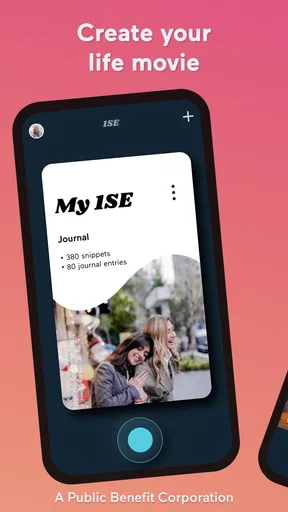
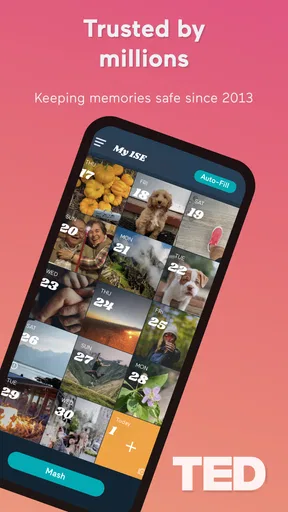
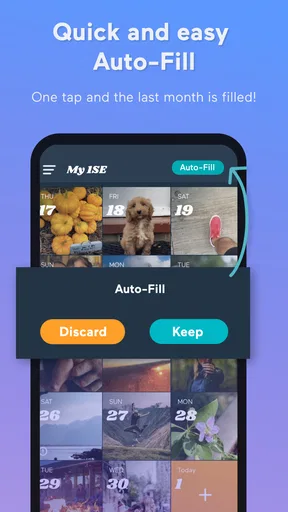
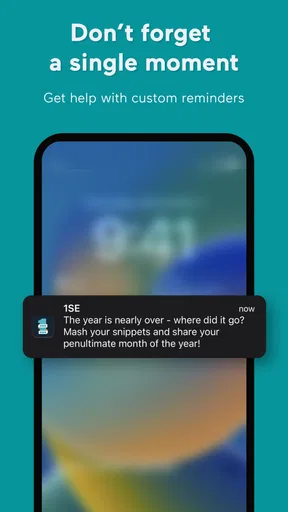
 Analysis by AppCompare
My favorite way to understand a video diary is not as a collection of polished clips, but as a tiny daily record that becomes more meaningful when you look back. 1 Second Everyday Video Diary is built around that idea: instead of asking me to film a whole day, it encourages a brief moment from it. The small commitment is the app’s defining strength, though it also shapes what the finished memory can and cannot show.
Why a single second changes the habit
A short daily clip lowers the bar for keeping a visual journal. I don’t need to plan a shoot, narrate an update, or decide whether the day was interesting enough to document. I can save a passing detail—a familiar walk, a meal with friends, or a child’s laugh—and get back to what I was doing. The result is less like a highlight reel assembled for an audience and more like a personal prompt to notice ordinary moments.
That approach suits people who take plenty of photos but rarely make anything from them. A camera roll can become a jumble of near-duplicates, screenshots, and images whose context fades. A daily video habit gives each selected clip a place in a sequence. The payoff comes later: a quick run through the diary can make small changes in routines, surroundings, or relationships easier to notice than they are while life is happening.
Choosing a useful moment, not a perfect one
In practice, the hardest part is often deciding what deserves that little slice of the day. I’d avoid treating the choice like a contest for the most dramatic scene. A clip of a familiar bus stop in bad weather may mean more later than a staged shot that looks impressive now. If nothing memorable happens, the ordinary detail is still a valid record; the point is continuity, not producing a daily miniature film.
A useful habit is to capture the moment when it occurs, then select the part that best brings it back to mind. That keeps the diary from turning into a late-night chore, when I may be tired and tempted to skip the day. It also helps to think about what I might want to remember: a sound, a face, a place, or a change in the season. A visual keepsake does not need to explain everything, but a clear subject can make it much easier to recognize later.
There is a trade-off in compressing a day so aggressively. One second can preserve a vivid impression, but it cannot hold a conversation, explain why a moment mattered, or show the build-up to an event. For a meaningful milestone, I would keep the full original video or add a note rather than rely on the brief excerpt alone. The daily edit is a doorway back to a memory, not a complete archive of everything that happened.
Getting Started with 1 Second Everyday
First things first, downloading and setting up 1 Second Everyday Video Diary is as straightforward as it gets. You download it, create an account, and boom - you’re ready to start capturing moments. The interface is super intuitive, so you don’t need a manual to navigate through it.
Worth Reading Before You Choose

Flipboard Shows What News Apps Must Do Beyond the Feed

Switching to Android Auto Means Rethinking Your Driving Routine

Google Calendar Makes a Crowded Week Easier to Manage

Ludo King Makes the Most of the Minutes Between Plans

Baby Panda World Brings Quick Play to Modern Phones, but Its Game Library Feels Busy

ESPN’s Live Game View Makes Following Close Games Easier
The concept is simple. Every day, you take a second-long video and add it to your diary. Over time, these seconds compile into a meaningful mosaic of memories. It’s fascinating how just a tiny clip can evoke a flood of memories.
Features That Make It Stand Out
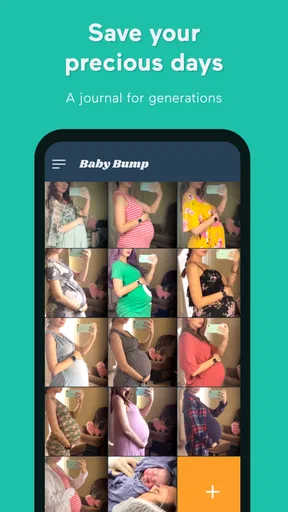
What I love about this app is its simplicity. There are no unnecessary bells and whistles. You get a calendar view that helps you keep track of your clips day by day. You can also add notes to each clip, which is handy if you’re like me and tend to forget what happened on a particular day.
Another cool feature is the ability to compile your seconds into a longer video. You can create monthly or yearly compilations, which is perfect for those of us who enjoy looking back at how much we’ve grown or changed.
"It’s amazing how a second can tell a story."
Using the App Daily
Getting into the habit of recording a second every day might sound daunting, but trust me, it becomes second nature. I found myself looking forward to capturing the highlight of my day. Whether it’s my morning coffee ritual or a quick clip of my pet doing something adorable, it’s a great way to appreciate the little things.
The app sends gentle reminders to add your daily second, which I find quite useful. It's easy to forget when life gets busy, and these notifications help keep my diary consistent.
Making a streak sustainable
For a realistic routine, I would connect the habit to something I already do, such as reviewing the day before bed or taking a short break after arriving home. A reminder can help, but it should be a nudge rather than another obligation. If a day slips by, restarting is more useful than abandoning the project because the record is no longer perfect. The diary’s value comes from the memories it preserves, not from proving that every day was equally eventful.
Privacy and comfort matter when filming around other people. I’d favor scenes that I’m happy to keep as personal memories, and avoid recording someone who has not agreed to be included. At gatherings, a detail such as the table, decorations, or a shared activity can recall the occasion without turning every moment into a camera moment. This makes the habit easier to maintain socially, especially for anyone who dislikes filming friends or family directly.
A day-to-day example
Imagine a workday that feels routine: breakfast, a commute, a stack of tasks, and dinner at home. There may be no obvious “highlight,” but a quick clip of morning light on the kitchen table or a child showing a drawing can anchor the day. Later, that image may bring back the mood and circumstances more effectively than a generic note saying the day was busy. This is where the format works best: it gives an ordinary day a memorable marker without demanding a full account of it.
For a holiday or a major family event, I’d use the diary differently. I might choose one representative moment for the daily entry while still recording longer footage separately. That way the year-in-review sequence stays concise, but the important event is not reduced to a single second. It is a practical distinction: the app can help me make a compact story, while a regular camera remains better for keeping a complete recording.
How it compares with a camera roll or editor
Compared with simply saving videos in a phone’s camera roll, this app gives the habit a clearer structure: one chosen moment per day, arranged as a diary and available for compilation. A camera roll is better when I want to keep many takes or search among a large volume of footage; it does not necessarily encourage me to revisit those clips as one ongoing story. The app’s focused format is useful precisely because it asks me to select, though that same selectiveness may frustrate someone who wants an untouched record.
A conventional video editor is the better choice when I want precise control over pacing, transitions, soundtrack, captions, or a finished piece for sharing. This diary is appealing when I want to make a small memory project without turning every entry into an editing session. I would not choose it as a replacement for a full-featured editor, nor would I expect a short daily sequence to serve as a complete family archive. It fills a narrower role: helping me collect and revisit selected moments over time.
Who will enjoy it—and who may not
I think it suits people who like reflective routines, families who want a lightweight record of changing everyday life, and travelers who enjoy revisiting a trip through small scenes rather than a long montage. It can also be a useful creative exercise for someone who wants to pay closer attention to their surroundings. The fact that it is a video journal rather than a general editing suite is important: its appeal depends on enjoying selection and looking back, not on elaborate production.
I’d recommend skipping it if the daily prompt feels like pressure, if you rarely want to film personal life, or if you mainly need to capture long events in full. It may also be a poor fit for someone who prefers writing because a brief image cannot capture every thought or feeling. In that case, a written diary, ordinary camera folders, or a standard editor may fit better. There is no need to force a video habit when another format feels more natural.
Before building a long-running diary, I would also consider how I want to keep and revisit the memories. A daily clip is most useful when I can find it again and feel comfortable with the way I have chosen to record it. Notes can supply context that the footage alone lacks; they are especially helpful for a quiet scene whose significance might otherwise be forgotten. That small bit of explanation can make a future compilation feel personal rather than like a sequence of attractive but ambiguous images.
Cost, compatibility, and practical expectations
The app is free to download, with in-app purchases ranging from about $4.49 to $249.99 per item. I’d start with the basic experience and decide whether the routine itself suits me before considering any purchase; the format is the main reason to use it, not a promise that paying will make every day easier to document. It is rated for everyone, and the developer is 1 Second Everyday, P.B.C.
It sits in the video players and editors space, but I see it as a memory-making tool more than a general-purpose player. It has a 4.0 average from around 17,000 ratings, and more than one million installs. It was released on October 28, 2019, and version 4.12.7 requires iOS 11 or later. Those details make it easier to judge basic fit, but the more important question is whether a one-moment-a-day routine sounds enjoyable rather than burdensome.
Final Thoughts
Overall, 1 Second Everyday Video Diary is a fantastic app for anyone looking to document their life creatively. It’s user-friendly, unobtrusive, and genuinely fun to use. Whether you’re a seasoned video editor or just starting, this app fits perfectly into your routine.
So, if you’re curious about trying something new and want to see your life unfold one second at a time, give it a shot. It’s a delightful way to capture the essence of everyday life.
My recommendation comes with one qualification: treat the daily clip as a prompt to notice life, not a rule you must satisfy. If that small ritual sounds satisfying, the calendar and compilations give it a natural reason to continue. If what you need is comprehensive recording or hands-on editing, another tool will serve you better. For a compact personal timeline that turns fleeting details into something worth revisiting, this app has a distinct and worthwhile purpose.
Pros
- Easy to capture daily moments.
- Simple and intuitive user interface.
- Supports multiple video formats.
- Offers creative editing options.
- Encourages daily mindfulness.
Cons
- Limited free version features.
- Video quality may vary.
- No built-in cloud storage.
- Requires regular app engagement.
- Subscription model for full access.
FAQs for 1 Second Everyday Video Diary
What is 1 Second Everyday Video Diary and how does it work?
1 Second Everyday Video Diary is an app that allows users to create a video montage of their life by compiling one-second clips from each day. Users can easily record and select snippets to add to their timeline, creating a personalized video diary. It's a simple, creative way to capture and reflect on daily moments.
Can I customize my video entries in 1 Second Everyday?
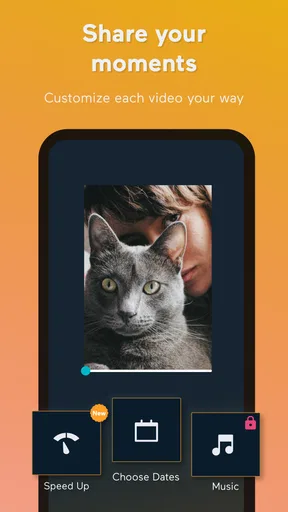
Yes, the app provides users with the flexibility to customize their entries. You can choose which second of your video to include and rearrange clips as needed. Additionally, the app offers editing features such as adding music, captions, and filters to enhance your video montages.
Is it possible to share my 1 Second Everyday videos with others?
Absolutely, the app allows users to easily share their video compilations with friends and family. You can export your videos in various formats and share them directly through social media platforms or messaging apps. This feature makes it easy to keep others updated on your life journey.
Does 1 Second Everyday require a subscription for full access?
While 1 Second Everyday offers a free version with essential features, a subscription is required for full access. The premium version includes additional features such as unlimited video backups, extended video length options, and access to advanced editing tools. Subscribing enhances the overall user experience.
How secure is my data with 1 Second Everyday?
The app prioritizes user privacy and data security. It employs encryption and secure servers to ensure that your videos and personal information are protected. Users can also choose to back up their videos to cloud services, providing an additional layer of security and peace of mind.


